

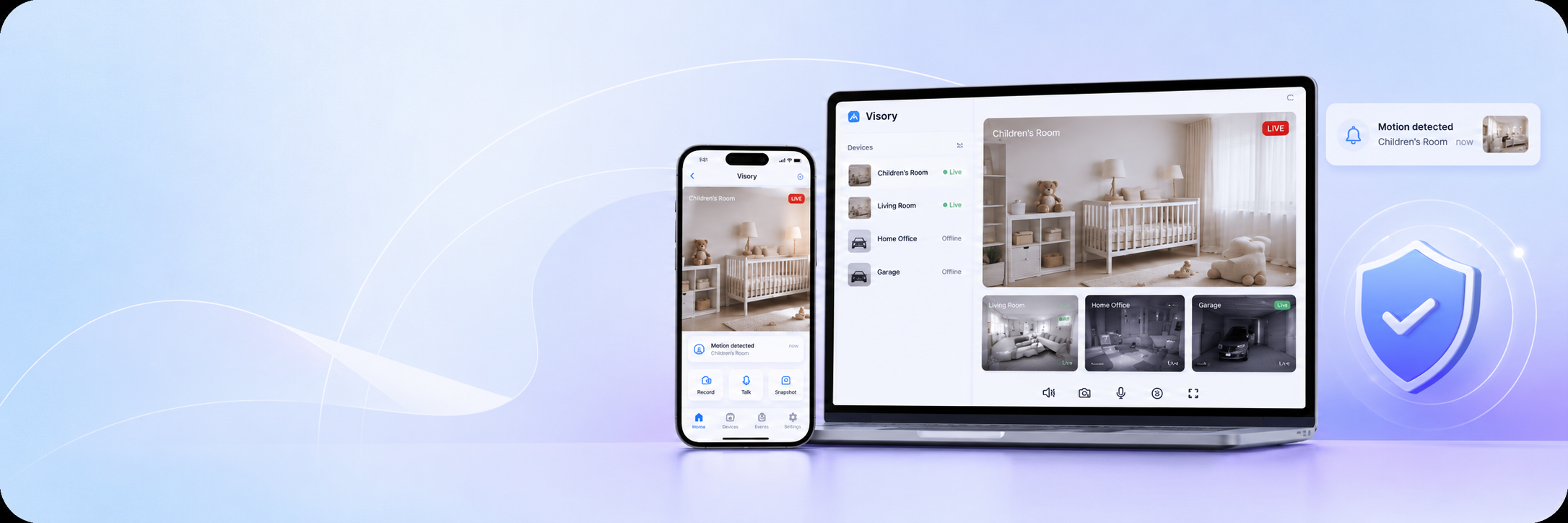
A spare phone placed on a shelf does more than most people realise. With the right app, it becomes a continuous indoor monitor — detecting movement, capturing footage in low light, and sending alerts the moment something unusual happens. Visory turns any iOS or Android device into a fully operational room tracking tool, giving you reliable visibility over any indoor space without purchasing a single piece of dedicated hardware.
What Is a room tracking app?
A room tracking app uses a smartphone or tablet’s built-in camera to monitor a specific indoor space continuously. It watches for movement, records what happens, and notifies you when activity is detected — functioning as a compact, app-controlled security system that runs on equipment you already own.
Unlike traditional fixed installations, a room tracking setup is entirely software-driven. The source device streams live footage; the viewing device receives it in real time. The Visory camera app handles both ends of this system, connecting phones, tablets, and laptops through a simple QR code pairing process. The result is indoor activity tracking that can be deployed in minutes and repositioned whenever circumstances change.
Benefits of indoor activity tracking and intelligent home protection
Passive awareness of what happens inside a space has real practical value — whether you’re monitoring a child’s room, an office after hours, or a rental property between stays. Intelligent home protection through an app removes the guesswork and replaces it with actual information.
Visory’s room tracking capabilities deliver several concrete advantages:
- Motion detection and instant alerts — the app identifies movement and sends a push notification immediately, so you’re informed without needing to watch the feed around the clock
- Night vision — clear footage in low-light conditions means the room remains monitored after dark without any additional equipment
- Live HD streaming — see what’s happening in real time from any location with an internet connection
- No hardware investment — an older phone or tablet becomes a fully functional monitoring unit at no extra cost
- Cross-platform access — view the feed from an Android device, an iPhone, or a laptop browser without compatibility issues
For households and small businesses alike, this combination of features makes continuous indoor activity tracking practical without the cost or complexity of a professional CCTV installation.
Where to use a room tracking app
The same app that watches a front hallway works equally well in a nursery, a storage room, or a shared office space. What changes between environments is the placement and sensitivity settings — the core functionality stays identical.
| Space | Monitoring purpose | Recommended placement |
|---|---|---|
| Children’s room | Movement and safety overnight | Shelf or windowsill facing the room |
| Living room | Intrusion detection, general activity | Elevated surface near the entrance |
| Home office | After-hours access monitoring | Desk corner or bookshelf |
| Nursery | Baby activity and overnight check-ins | Stable surface at crib level |
| Rental property | Damage documentation, check-ins | Main living area entrance |
| Storage or utility room | Unauthorised access detection | High corner with full-room view |
For nursery monitoring in particular, Visory already supports motion-based alerts and live streaming. Baby cry detection is currently in development and will be added as an app update, extending the app’s usefulness as a baby monitor app without requiring new hardware.
How to set up an app-controlled security system
Deploying an app-controlled security system with Visory follows the same process regardless of what room you’re monitoring. The setup requires two devices — one as the source, one as the viewer — and an internet connection on both.
Step 1. Download the Visory camera app from Google Play or the App Store on both devices. If you’re using a laptop as the viewer, open the Web App at app.visory.cam — no installation required.
Step 2. On the source device, open Visory and select camera mode. Set the field of view and adjust motion detection sensitivity based on the room’s size and expected activity level.
Step 3. On the viewing device, open Visory and scan the QR code shown on the source device. The connection is established immediately — no network credentials, no manual configuration.
Step 4. Position the source device using the live preview on your viewer to confirm the angle covers the area you need. Once the view is correct, the system is active.
The entire process takes under ten minutes. Because Visory runs in the background on the source device, the screen can remain off while monitoring continues uninterrupted.
Intrusion detection system and smart alerts for unusual activity
One of the most relied-upon aspects of room tracking is knowing when something happens that shouldn’t. Visory’s motion detection functions as a practical intrusion detection system — scanning the feed continuously and triggering an alert the moment movement appears within the monitored frame.
Each alert is timestamped, so you can review exactly when activity occurred without watching hours of footage. The detection runs in the background without any manual input, and notifications reach the viewing device over Wi-Fi or mobile data regardless of where you are. For spaces that are normally unoccupied — a storage room, a home office overnight, a property between tenants — this makes it straightforward to distinguish between expected activity and something that warrants attention. Looking ahead, the platform is also developing stranger detection and glass break detection, which will add further layers to what the intrusion detection system can identify, all delivered through the same app with no hardware changes required.
Mini security camera app and baby monitor app: key features
Visory camera app works effectively both as a mini security camera app for compact, discreet room coverage and as a baby monitor app for nursery and overnight child monitoring. The current feature set supports both use cases directly.
The core capabilities available now include live HD video streaming, continuous motion detection with push notifications, night vision for low-light environments, and QR code pairing for instant device connection. These cover the practical requirements of both room security and child monitoring.
The platform is also actively building out a set of sound and event-based detection features specifically relevant to home monitoring. Baby cry detection, pet sound detection, fire alarm detection, and glass break detection are all in development and will be released as updates. When available, they will expand Visory’s usefulness as a baby monitor app considerably — combining visual monitoring with sound-triggered alerts in a single interface.
Why choose Visory room tracking app?
Visory camera app works across iOS, Android, and web browsers, so the device you monitor with doesn’t need to match the device running the stream. A single subscription with no hidden fees — covers the complete feature set and can be cancelled at any time.
The setup process is designed for people who aren’t technically inclined. QR code pairing eliminates manual configuration entirely, and the interface requires no prior experience with surveillance software. For anyone who wants consistent indoor activity tracking, a reliable intrusion detection system for a specific room, or a straightforward way to keep an eye on a child overnight, Visory turns existing devices into a working solution in minutes.
FAQ
Does Visory currently work as a baby monitor app?
Yes, in part. Live streaming and motion detection are available now and work well for nursery monitoring. Baby cry detection is in active development and will be added as an app update, extending the platform’s sound-based monitoring capabilities.
Can I use an old phone as the room monitoring device?
Yes. Any iOS or Android device with a working camera and an internet connection can serve as the source. Older phones are well suited to this role since they don’t need to handle other tasks while running Visory.
Does the screen need to stay on while monitoring?
No. Visory runs in the background, allowing the source device’s screen to remain off while streaming and motion detection continue normally.
How does the intrusion detection system handle false alerts?
Motion detection sensitivity can be adjusted during setup to suit the specific room and level of expected activity, reducing the frequency of alerts caused by minor or expected movement.